Creators, labels, and project teams sometimes need an MP3 copy of music they have made or licensed. YTBMP3.NET can help prepare that audio from an authorized public video link, without adding unnecessary steps to the process.
Understand the rights behind the music
Music can include separate rights in the composition, lyrics, sound recording, and video. Make sure your ownership, agreement, or licence covers the specific recording and the way you plan to use the MP3. This is especially important for work made with collaborators, commissioned tracks, remixes, and client productions.
Good sources for permitted conversion include your own uploads, music you control for a project, client-provided recordings with approval, and content released under a licence that clearly allows the intended download and use.
Steps to download an authorized MP3
- Review the permission. Confirm that you own the music or have authorization from every relevant rights holder.
- Copy the video URL. Copy the full public YouTube link for the authorized music video.
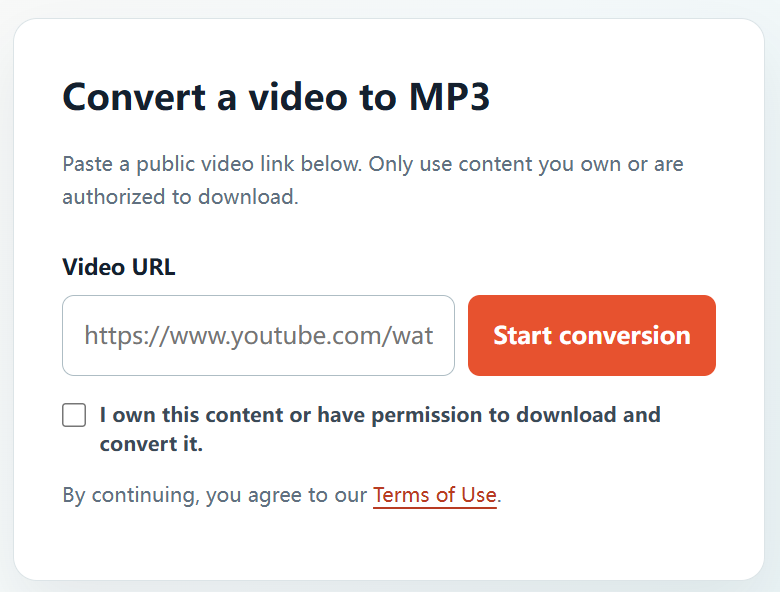
- Open the converter. Visit the YTBMP3.NET homepage and paste the URL into the Video URL field.
- Confirm your right to convert. Tick the confirmation box once you have checked that the request is permitted.
- Begin processing. Select Start conversion and leave the browser page open until processing has finished.
- Save the MP3 file. Use the download button when the audio is ready.
Keep your music workflow organized
- Store licences, split sheets, permissions, and approval emails alongside each project.
- Observe any attribution, platform, duration, territory, or commercial-use conditions in the licence.
- Keep a copy of your original master files whenever possible.
- Do not use the converter to copy commercial music or any private, protected, or unlicensed material.
Frequently asked questions
Can I download music from my own YouTube upload?
Yes, provided you own or control the rights needed for the audio and video, or have the appropriate authorization.
Can I download music posted publicly by another artist?
Only with permission from the rights holder or under a licence that clearly permits the download and conversion you intend to make.
Where can I begin?
Visit the YTBMP3.NET homepage, paste an authorized public video URL, confirm your rights, and begin conversion.