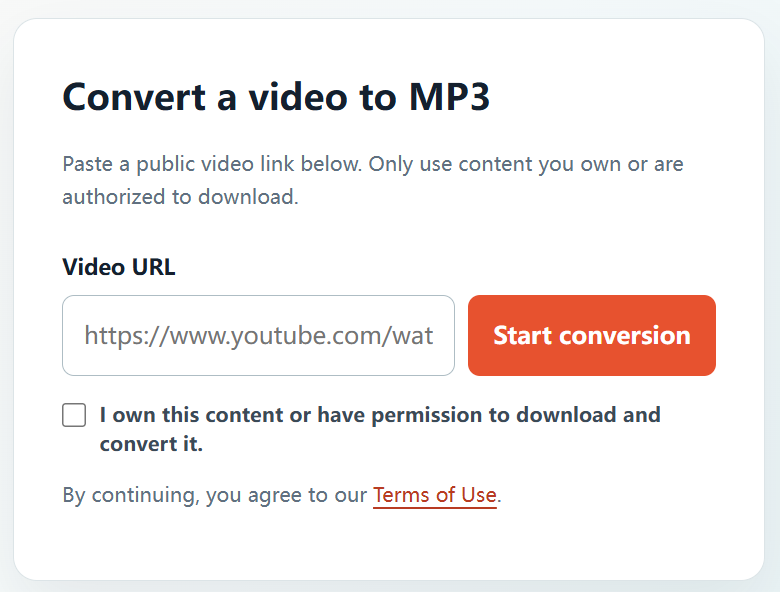
Converting a video to an MP3 can help you listen to an approved recording on the go, prepare audio for your own editing project, or keep a permitted audio reference. YTBMP3.NET is designed for that straightforward workflow when the source video is yours or you have the necessary permission.
Make sure the video is authorized
Before starting, verify that you have a valid basis to create an MP3. Common examples include videos you uploaded yourself, media created for your organization, client content with approval, public-domain recordings, and works released under a licence that allows this use.
When a video was created by someone else, request permission from the owner. Review any licence terms carefully and comply with requirements such as attribution where applicable.
How to convert a YouTube video to an MP3
- Open the authorized video. Find the public YouTube video you are permitted to download and convert.
- Copy the full video link. Use the address bar or Share option to copy the complete URL.
- Visit YTBMP3.NET. Go to the homepage converter and paste the URL into the Video URL field.
- Confirm your permission. Select the rights confirmation box only when you know you own the content or have permission to use it.
- Start the conversion. Select Start conversion and keep the page open while the audio is processed.
- Download your MP3. Select the download button when the completed audio file is ready.
Helpful conversion tips
- Copy the complete public video URL, not just the video title.
- Leave the page open during conversion, especially for longer approved videos.
- Submit one conversion at a time to avoid duplicate requests.
- Keep the original media file when you have access to it; it is normally the best-quality source.
Respect creators and licences
Only use the MP3 in ways that your ownership, licence, or permission allows. Do not use a converter to bypass access restrictions, download private material, or reproduce content you are not authorized to use. Keeping permissions and licences with your project records is a useful practice.
Frequently asked questions
Can I convert a video from my own YouTube channel?
Yes, when you own the video and the necessary rights to its audio and visual content.
Can I use this for another creator’s public video?
Only if the creator or rights holder has permitted the download and conversion, or an applicable licence clearly allows it.
Where can I begin converting?
Visit the YTBMP3.NET homepage, paste the public URL for an authorized video, confirm your rights, and start the conversion.