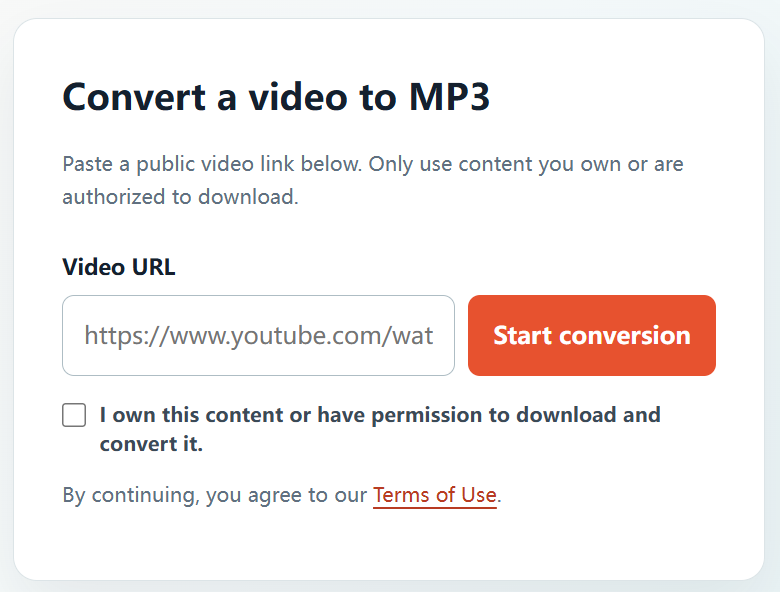
The practical part of converting a video to MP3 is simple. The important first step is confirming that you have the right to make the audio copy. Once that is clear, YTBMP3.NET lets you convert an authorized public video link using a short, browser-based process.
What should I check first?
Confirm that you have a valid right to create the MP3. This can include your own YouTube uploads, video work commissioned for you, client media with written approval, public-domain material, and content released under a licence that permits the use you need.
When another creator owns the material, ask them before proceeding. Retain a copy of the relevant licence, agreement, or approval email for your records.
Steps to convert an authorized YouTube video
- Choose the authorized source. Open the public YouTube video you are allowed to download and convert.
- Copy its full link. Copy the complete URL from the address bar or the Share menu.
- Visit YTBMP3.NET. Open the homepage converter and paste the URL into the Video URL field.
- Confirm your rights. Tick the confirmation box after checking that you own the content or have permission to use it.
- Start processing. Select Start conversion and keep the page open while the MP3 is prepared.
- Download the result. Select Download after the completed MP3 file becomes available.
Make conversion smoother
- Paste a complete, public video URL rather than a partial link.
- Keep the page open during processing; long authorized videos may take more time.
- Avoid sending the same conversion again while the first request is active.
- Use the original project media whenever it is available, as it is typically the highest-quality source.
Use the MP3 responsibly
Download and use the MP3 only as allowed by your ownership, permission, or licence. Do not use conversion to copy private, restricted, protected, or unlicensed media. For professional projects, save your permissions with the related files.
Frequently asked questions
Can I convert a video from my own channel?
Yes, if you own the video and the underlying audio rights, or have the required authorization.
Can I convert a public video by another creator?
Only when the rights holder has permitted the download and conversion, or a relevant licence clearly allows your intended use.
Where do I begin?
Go to the YTBMP3.NET homepage, paste the URL for an authorized public video, confirm your rights, and start conversion.